圈子切换按钮调用不同频道的数据
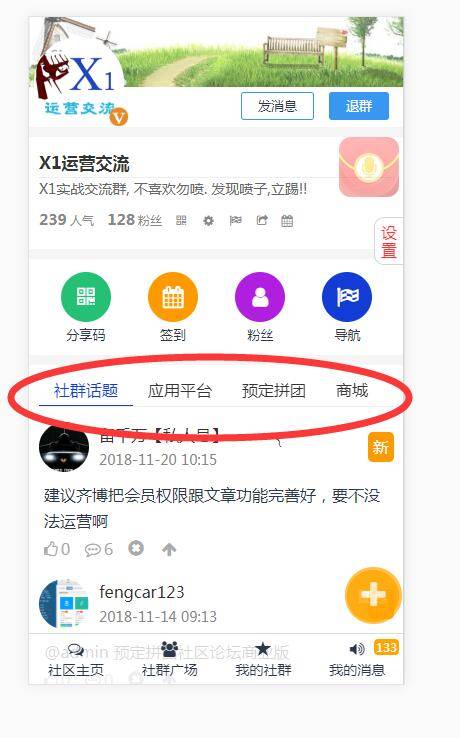
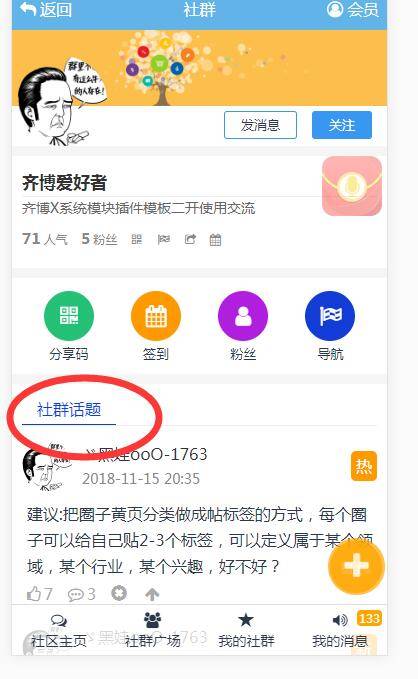
大家可以看看下图中分别圈起来的地方. 可以根据用户是否有对应的数据,就显示或者隐藏起来.
同时这些频道的数据,都是异步加载更新的,也可以下拉显示更多. 默认放了几个频道.大家可以参考源代码,可以放更多的频道. 并不会影响页面的打开速度.都是异步加载的.
这样异步更新.可以给到用户更好的体验.
参考代码如下:
<style type="text/css">.title-btn .cnt-box{  display:none;}.title-btn .cnt_bbs{  display:block;  /*默认显示论坛的数据*/}
.title-btn .head{  height:31px;}.title-btn .tag{  padding-left:15px;  padding-right:15px;}.title-btn .ck{  color:#133CD7;  border-bottom:1px solid #133CD7;}.swiper-slide{width: auto!important;}  /*滑动按钮必须的设置,其中swiper-slide类名不能更换*/</style><!-- 滑动按钮要用到的CSS与JS文件,他涉及到三个class类 swiper-container swiper-wrapper swiper-slide --><link href="__STATIC__/libs/swiper/swiper.min.css" rel="stylesheet"><script src="__STATIC__/libs/swiper/swiper.min.js"></script><script>    $(function () {        var swiper = new Swiper('.swiper-container', {            spaceBetween: 0,            slidesPerView:'auto',            freeMode: true        });    })</script>  <div class="SideBox title-btn">    <!--切换菜单开始-->    <div class="head">      <div class="swiper-container">        <div class="swiper-wrapper">          <span class="tag swiper-slide ck" data-type="cnt_bbs">__QUN__话题</span>          {if modules_config('appstore')}<span class="tag swiper-slide" data-type="cnt_appstore">{:modules_config('appstore')['name']}</span>{/if}          {if modules_config('booking')}<span class="tag swiper-slide" data-type="cnt_booking">{:modules_config('booking')['name']}</span>{/if}          {if modules_config('shop')}<span class="tag swiper-slide" data-type="cnt_shop">{:modules_config('shop')['name']}</span>{/if}          {if modules_config('cms')}<span class="tag swiper-slide" data-type="cnt_news">{:model_config(1,'cms')['title']}</span>{/if}          {if modules_config('cms')}<span class="tag swiper-slide" data-type="cnt_photo">{:model_config(2,'cms')['title']}</span>{/if}        </div>      </div>    </div>    <!--切换菜单结束-->    <!--论坛开始-->    <div class="cnt-box cnt_bbs listBbs">      {qb:hy name="qun_wapshow_bbs001" type="bbs" where="ext_id=$id" order="qun_status desc,list desc" rows="8" }      <div class="lists">        <ul>          <li class="img"><a href="{$rs.user_url}"><img src="{$rs.user_icon}" onerror="this.src='__STATIC__/images/nopic.png'"></a></li>          <li class="info"><span>{$rs.username}</span><em>{$rs.time}</em></li>          <li class="more"><span>{if ($rs.status>1)}精{elseif (time()-$rs.create_time<3600*24)}新{elseif ($rs.view>10)}热{/if}</span></li>        </ul>        <a href="{$rs.url}">        <dl>          <dt>{$rs.title}</dt>          {if (count($rs.picurls)>2)}          <dd>            {volist name="$rs.picurls" id="pic"}              {lt name="i" value="4"}                <div><span><img src="{$pic.picurl}"onerror="this.src='__STATIC__/images/nopic.png'" width="78" height="78" /></span></div>              {/lt}            {/volist}          </dd>          {/if}        </dl>        </a>        <div class="others">          <span><i class="fa fa-thumbs-o-up">{$rs.agree}</i></span>          <em><i class="fa fa-commenting-o">{$rs.replynum}</i></em>          <em><i class="glyphicon glyphicon-remove-sign act-delete" data-id="{$rs.id}" data-uid="{$rs.uid}" data-sys="bbs"></i></em>          <em><i class="fa fa-arrow-up act-top" data-id="{$rs.id}" data-type="{$rs.qun_status}" data-sys="bbs"></i></em>        </div>      </div>      {/qb:hy}    </div>    <!--论坛结束-->    <!--应用市场开始-->    {if modules_config('appstore')}    <div class="cnt-box cnt_appstore listPhoto">      {qb:hy name="qun_wapshow_appstore001" type="appstore" mid="-1" where="uid=$info.uid" order="id" by="desc" rows="6" js="cnt_appstore"}      <li><a href="{$rs.url}"><span><img src="{$rs.picurl}" onerror="this.src='__STATIC__/images/nopic.png'"></span><em>{$rs.title}</em></a>      </li>      {/qb:hy}    </div>    {/if}    <!--应用市场结束-->    <!--商城开始-->    {if modules_config('shop')}    <div class="cnt-box cnt_shop listPhoto">      {qb:hy name="qun_wapshow_shop001" type="shop" mid="1" where="uid=$info.uid" order="id" by="desc" rows="6" js="cnt_shop"}      <li><a href="{$rs.url}"><span><img src="{$rs.picurl}" onerror="this.src='__STATIC__/images/nopic.png'"></span><em>{$rs.title}</em></a>      <i class="glyphicon glyphicon-remove-sign act-delete" data-id="{$rs.id}" data-uid="{$rs.uid}" data-sys="shop"></i>      </li>      {/qb:hy}    </div>    {/if}    <!--商城结束-->    <!--拼团开始-->    {if modules_config('booking')}    <div class="cnt-box cnt_booking listPhoto">      {qb:hy name="qun_wapshow_booking001" type="booking" mid="1" where="uid=$info.uid" order="id" by="desc" rows="6" js="cnt_booking"}      <li><a href="{$rs.url}"><span><img src="{$rs.picurl}" onerror="this.src='__STATIC__/images/nopic.png'"></span><em>{$rs.title}</em></a>      </li>      {/qb:hy}    </div>    {/if}    <!--拼团结束-->    <!--图片开始-->    {if modules_config('cms')}    <div class="cnt-box cnt_photo listPhoto">      {qb:hy name="qun_wapshow_photo001" type="cms" mid="2" where="uid=$info.uid" order="id" by="desc" rows="6" js="cnt_photo"}      <li><a href="{$rs.url}"><span><img src="{$rs.picurl}" onerror="this.src='__STATIC__/images/nopic.png'"></span><em>{$rs.title}</em></a>      </li>      {/qb:hy}    </div>    {/if}    <!--图片结束-->    <!--文章开始-->    {if modules_config('cms')}    <div class="cnt-box cnt_news listBbs">      {qb:hy name="qun_wapshow_news001" type="cms" mid="1" where="uid=$info.uid" order="id" by="desc" rows="8" js="cnt_news"}      <div class="lists">        <ul>          <li class="img"><a href="{$rs.user_url}"><img src="{$rs.user_icon}" onerror="this.src='__STATIC__/images/nopic.png'"></a></li>          <li class="info"><span>{$rs.username}</span><em>{$rs.time}</em></li>          <li class="more"><span>{if ($rs.status>1)}精{elseif (time()-$rs.create_time<3600*24)}新{elseif ($rs.view>10)}热{/if}</span></li>        </ul>        <a href="{$rs.url}">        <dl>          <dt>{$rs.title}</dt>          {if (count($rs.picurls)>2)}          <dd>            {volist name="$rs.picurls" id="pic"}              {lt name="i" value="4"}                <div><span><img src="{$pic.picurl}"onerror="this.src='__STATIC__/images/nopic.png'" width="78" height="78" /></span></div>              {/lt}            {/volist}          </dd>          {/if}        </dl>        </a>      </div>      {/qb:hy}    </div>    {/if}    <!--文章结束-->    <!--<div class="ShowMore2" onclick='showMoreCnt()'><span>点击查看更多</span></div>-->  </div></div>
<script type="text/javascript">//切换按钮$(function(){  $(".title-btn .swiper-slide").click(function(){    $(".title-btn .swiper-slide").removeClass('ck');    $(this).addClass('ck');    now_type = $(this).data('type');    $('.title-btn .cnt-box').hide();    $('.title-btn .'+now_type).show();    scroll_get = true;    //showMoreCnt();  });});
var now_type = 'cnt_bbs';  //当前显示的模块//加载每个频道的分页地址var url_db = {  cnt_bbs:"{qb:hy_url name='qun_wapshow_bbs001' /}",  cnt_shop:"{qb:hy_url name='qun_wapshow_shop001' /}",  cnt_booking:"{qb:hy_url name='qun_wapshow_booking001' /}",  cnt_news:"{qb:hy_url name='qun_wapshow_news001' /}",  cnt_photo:"{qb:hy_url name='qun_wapshow_photo001' /}",  cnt_appstore:"{qb:hy_url name='qun_wapshow_appstore001' /}",};
var page_db = {};  //每个频道的页码数function showMoreCnt(){  if(typeof(page_db[now_type])=='undefined'){    page_db[now_type] = 1;  }  page_db[now_type]++;  var url = url_db[now_type] + page_db[now_type];  $.get(url,function(res){    if(res.code==0){      if(res.data==''){        if(page_db[now_type]>3)layer.msg("已经显示完了!",{time:500});        //$('.ShowMore2').hide();      }else{        $('.title-btn .'+now_type).append(res.data);        scroll_get = true;      }    }else{      layer.msg(res.msg,{time:2500});    }  });}

//滚动显示更多var scroll_get = true;  //做个标志,不要反反复复的加载$(document).ready(function () {  $(window).scroll(function () {    if (scroll_get==true &&  (400 + $(window).scrollTop())>($(document).height() - $(window).height())) {      scroll_get = false;      if(typeof(page_db[now_type])>1)layer.msg('内容加截中,请稍候',{time:1500});      showMoreCnt();    }  });});
//异步处理,对应的数据不存在,就隐藏其按钮function cnt_shop(res){if(res.paginate.total==0){$(".swiper-slide[data-type='cnt_shop']").hide();}}function cnt_booking(res){if(res.paginate.total==0){$(".swiper-slide[data-type='cnt_booking']").hide();}}function cnt_appstore(res){if(res.paginate.total==0){$(".swiper-slide[data-type='cnt_appstore']").hide();}}function cnt_news(res){if(res.paginate.total==0){$(".swiper-slide[data-type='cnt_news']").hide();}}function cnt_photo(res){if(res.paginate.total==0){$(".swiper-slide[data-type='cnt_photo']").hide();}}

//对论坛异步加载进来的数据做处理function cnt_bbs(res){  if(res.code==0){  //数据加载成功后    act_delete();    act_top();  }}
//贴子的删除功能function act_delete(){  var power = {if $userdb.groupid==3||$gid==2} true {else /} false {/if};  $(".act-delete").each(function(){    var that = $(this);    if(power!=true && '{$userdb.uid}'!=that.data('uid')){      that.hide();    }    var url = "{:urls('wxapp.act/delete')}?sysname=" + that.data('sys') + '&id=' + that.data('id');    that.click(function(){      layer.confirm('你确认要删除吗?',{btn:['确认删除','取消'],},function(){        $.get(url,function(res){          layer.closeAll();          if(res.code==0){            layer.msg('删除成功');            setTimeout(function(){              window.location.reload();            },500);          }else{            layer.alert(res.msg);          }        });      });    });  });}
//贴子的置顶功能function act_top(){  var power = {if $userdb.groupid==3||$gid==2} true {else /} false {/if};  $(".act-top").each(function(){    var that = $(this);    if(power!=true){      that.hide();    }    if(that.data('type')!='0'){      that.css({'color':'blue'});    }    var url = "{:urls('wxapp.act/top')}?sysname=" + that.data('sys') + '&id=' + that.data('id');    that.click(function(){      layer.confirm('你确认执行置顶相关吗?',{btn:['确认','取消'],},function(){        $.get(url,function(res){          layer.closeAll();          if(res.code==0){            layer.msg('执行成功');            setTimeout(function(){              window.location.reload();            },500);          }else{            layer.alert(res.msg);          }        });      });    });  });}act_top();

</script>
如果要加入更多的频道,注意有几处地方要同时增加, 第一步,对应的加按钮,次序无所谓
<div class="swiper-wrapper"> <span class="tag swiper-slide ck" data-type="cnt_bbs">__QUN__话题</span> {if modules_config('appstore')}<span class="tag swiper-slide" data-type="cnt_appstore">{:modules_config('appstore')['name']}</span>{/if} {if modules_config('booking')}<span class="tag swiper-slide" data-type="cnt_booking">{:modules_config('booking')['name']}</span>{/if} {if modules_config('shop')}<span class="tag swiper-slide" data-type="cnt_shop">{:modules_config('shop')['name']}</span>{/if} {if modules_config('cms')}<span class="tag swiper-slide" data-type="cnt_news">{:model_config(1,'cms')['title']}</span>{/if} {if modules_config('cms')}<span class="tag swiper-slide" data-type="cnt_photo">{:model_config(2,'cms')['title']}</span>{/if} </div>第二步,对应的加数据调用显示标签及模板,次序也无所谓的
<!--拼团开始--> {if modules_config('booking')} <div class="cnt-box cnt_booking listPhoto"> {qb:hy name="qun_wapshow_booking001" type="booking" mid="1" where="uid=$info.uid" order="id" by="desc" rows="6" js="cnt_booking"} <li><a href="{$rs.url}"><span><img src="{$rs.picurl}" onerror="this.src='__STATIC__/images/nopic.png'"></span><em>{$rs.title}</em></a> </li> {/qb:hy} </div> {/if} <!--拼团结束-->第三步,加分页地址,如果你不想显示分页加载更多的话,可以不加
var url_db = { cnt_bbs:"{qb:hy_url name='qun_wapshow_bbs001' /}", cnt_shop:"{qb:hy_url name='qun_wapshow_shop001' /}", cnt_booking:"{qb:hy_url name='qun_wapshow_booking001' /}", cnt_news:"{qb:hy_url name='qun_wapshow_news001' /}", cnt_photo:"{qb:hy_url name='qun_wapshow_photo001' /}", cnt_appstore:"{qb:hy_url name='qun_wapshow_appstore001' /}",};第四步,根据该用户是否有此频道的数据,来显示或者隐藏这个频道的按钮,不加的话,就不会隐藏.也就是说不有任何数据,也会显示此按钮
function cnt_shop(res){if(res.paginate.total==0){$(".swiper-slide[data-type='cnt_shop']").hide();}}function cnt_booking(res){if(res.paginate.total==0){$(".swiper-slide[data-type='cnt_booking']").hide();}}function cnt_appstore(res){if(res.paginate.total==0){$(".swiper-slide[data-type='cnt_appstore']").hide();}}function cnt_news(res){if(res.paginate.total==0){$(".swiper-slide[data-type='cnt_news']").hide();}}function cnt_photo(res){if(res.paginate.total==0){$(".swiper-slide[data-type='cnt_photo']").hide();}}只要参考这四步,对应的加元素,就可以显示其它频道的数据了.
其中 <div class="cnt-box cnt_bbs listBbs">``<div class="cnt-box cnt_appstore listPhoto">
cnt-box是JS统一处理要用到的类 listBbs是文字排版的样式类 listPhoto是图片排版的样式类 cnt_bbs``cnt_appstore 这些就是不同频道的关键字
这个是跟据用户UID调用数据的, 你可以换位思考,把条件删除,放在频道主页的话,同样适用的.不过需要把标签 qb:hy 全换替换为 qb:tag qb:hy_url 全换成qb:url